
Nintendo DS

Nintendo DS Browser
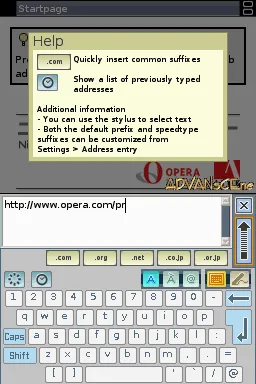
Nintendo DS Browser makes use of the Nintendo DS's touchscreen for input, with an on-screen keyboard as well as handwriting recognition and a stock of pre-set text (for example, the .com and .org top-level domains). The browser can render pages in two modes, Small Screen Rendering (SSR) or Overview. In Small Screen Rendering mode, the contents of the page are displayed in a single column fitting the width of the screen - for example, a page featuring two columns of text side-by-side would be displayed as a single column, one after the other. In Overview mode, a scaled-down version of the page is displayed on the touchscreen with a small selection box which can be moved around using the stylus. The contents of the selection box are displayed on the top screen at their full size. This selection can be brought into the touchscreen to perform such actions as click on links or entering text in boxes. The browser connects to the network through IEEE 802.11 Wi-Fi access points or hotspots using the built-in wireless capability of the Nintendo DS. While WEP encryption is supported, WPA encryption is not. Nintendo has partnered with Internet security company Astaro to integrate web filtering technology into the Nintendo DS Browser. Called Astaro Parental Control, the technology acts as a proxy filter, providing the option of blocking inappropriate content.[6] This is provided free of charge and can be activated through a simple menu option. The Nintendo DS browser supports JavaScript and SSL in web pages,[7] but does not support plugins like Adobe Flash, or bold text.[8] Due to limited system resources, most other dynamic media, such as videos or sound, will not work in the browser.
- Veröffentlichung
- July 24, 2006
- Entwickler
- Nintendo
- Publisher
- Nintendo
- Spieler
- 1
Über dieses Spiel
Nintendo DS Browser
Nintendo DS Browser makes use of the Nintendo DS's touchscreen for input, with an on-screen keyboard as well as handwriting recognition and a stock of pre-set text (for example, the .com and .org top-level domains).
The browser can render pages in two modes, Small Screen Rendering (SSR) or Overview. In Small Screen Rendering mode, the contents of the page are displayed in a single column fitting the width of the screen - for example, a page featuring two columns of text side-by-side would be displayed as a single column, one after the other. In Overview mode, a scaled-down version of the page is displayed on the touchscreen with a small selection box which can be moved around using the stylus. The contents of the selection box are displayed on the top screen at their full size. This selection can be brought into the touchscreen to perform such actions as click on links or entering text in boxes.
The browser connects to the network through IEEE 802.11 Wi-Fi access points or hotspots using the built-in wireless capability of the Nintendo DS. While WEP encryption is supported, WPA encryption is not.
Nintendo has partnered with Internet security company Astaro to integrate web filtering technology into the Nintendo DS Browser. Called Astaro Parental Control, the technology acts as a proxy filter, providing the option of blocking inappropriate content.[6] This is provided free of charge and can be activated through a simple menu option.
The Nintendo DS browser supports JavaScript and SSL in web pages,[7] but does not support plugins like Adobe Flash, or bold text.[8] Due to limited system resources, most other dynamic media, such as videos or sound, will not work in the browser.
Studios und Mitwirkende
- Developer
- Nintendo
- Publisher
- Nintendo
Regionale Veröffentlichungen
Veröffentlichung
Artwork-Galerie
6 images
Artwork hinzufügen
Help this listing look its best.
Share missing box backs, screenshots, clear logos, cartridges, discs, and other useful art. Nothing appears publicly until an administrator reviews it.